


.png)

The Challenge
Governance in Microsoft 365 is a significant challenge. Uncontrolled creation of workspaces and objects, such as Teams, SharePoint sites, and Guest Users, leads to chaos and inefficiency. This unmanaged sprawl threatens productivity and increases the risks of oversharing and data loss.
Without proper oversight, IT administrators are overwhelmed with mundane tasks, from managing user permissions to maintaining workspaces. This not only consumes valuable time but also distracts from strategic initiatives that drive business growth.
Moreover, the lack of standardised processes results in inconsistent governance. It becomes difficult to track who has access to what, leading to potential security vulnerabilities and compliance issues. The absence of clear governance guidelines adds to these problems, leaving many workspaces and M365 objects orphaned and unmanaged.
Given these challenges, a strategic approach to governance is crucial. Organisations need a solution that balances control with collaboration. More importantly, a modern governance solution must be built around your most important asset – your users – to maximise their experience.
Affirmatic streamlines Microsoft 365 management with a consistent governance framework
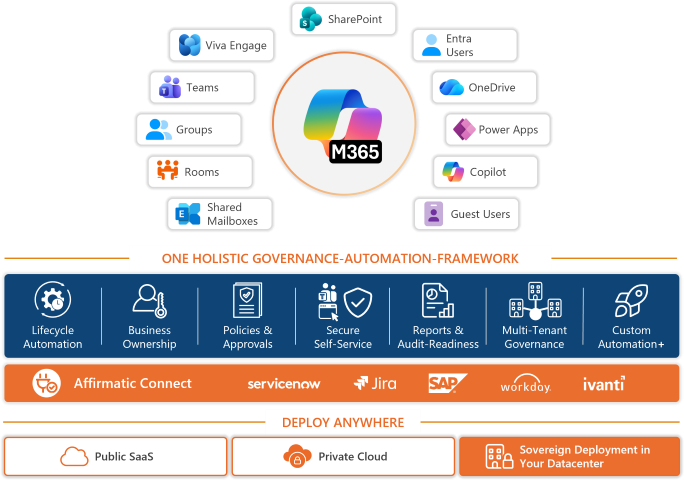
Lifecycle Management
Streamline your Microsoft 365 environment with automated lifecycle management. Define object lifecycles, set expiration dates, and automate archiving to prevent sprawl and ensure a well-organised digital workspace.
Learn more about Lifecycle Management >
Business Ownership
Ensure accountability and prevent orphaned objects by assigning multiple business owners to each workspace and object. Maintain continuous management and adapt ownership dynamically to fit organisational changes.
Learn more about Business Ownership >
Request and Approval Workflows
Empower users with controlled self-service while maintaining governance. Streamline the creation and management of Teams, SharePoint sites, and more through a robust ticketing and approval system.
Learn more about Request and Approval Workflows >
Templates, Policies and Reports
Standardise object creation and enforce governance with customisable templates and policies. Tailor settings to organisational departments and maintain consistency across your users, enhancing control and compliance.
Learn more about Templates, Policies and Reports >
Multi-Tenant Management from One Interface
Affirmatic ensures consistent governance across all tenants or allows for tenant-specific policies, making it ideal for complex M365 environments and MSPs managing multiple clients.
Learn more about Multi-Tenant Management >
M365 Services & Objects / Features
- Teams
- SharePoint / OneDrive
- Groups
- Shared Mailboxes
- Entra User
- Guest User
Teams
- Create and Manage Teams: Efficiently create and manage Microsoft Teams for streamlined collaboration with predefined configurations.
- Directory Overview: Load a comprehensive directory of all teams and channels.
- Automated Governance: Configure triggers for automated governance actions.
SharePoint / OneDrive
- Create and Manage SharePoint: Facilitate the creation and management of group connected and standalone SharePoint sites.
- Centralized Management: Centrally manage SharePoint sites and OneDrive storage.
- Site and Storage Overview: Load an overview of all sites and storage usage.
- Consistent Policies: Apply consistent governance policies.
Groups
- Group Creation and Management: Facilitate the creation and management of Microsoft 365 Groups.
- Group Directory: Load a directory of all groups and their statuses.
- Automated Governance: Set up triggers for automated governance actions for following group types:
- Security groups
- Mail enabled security groups
- Distribution groups
- M365 groups
- Teams
Shared Mailboxes
- Mailbox Management: Create and manage shared mailboxes across tenants.
- Mailbox Overview: Load an overview of mailbox activity and storage.
- Governance Triggers: Configure triggers for automated governance actions.
Entra User
- Create Entra Users: Facilitate creation of Entra users with business owners and approval workflows
- Identity and Access Management: Manage user identities including licenses and access.
- User Directory: Load a directory of all users and their organisational departments.
- Automated Governance: Configure triggers for automated governance actions.
Guest User
- Guest Access Management: Create and manage guest user access, permissions and domains.
- Guest Directory: Load an overview of all guest users and their activities.
- Custom Policies: Apply custom policies for external users.