As a Microsoft 365 Administrator, you're probably familiar with this scenario: Teams are created at will, nobody knows which team is responsible for what anymore, orphaned teams accumulate, and the structure becomes increasingly chaotic. This is exactly where Teams Governance comes in – a structured approach to ensure order, security, and efficiency in your Teams environment.
The Fundamentals: What Does Governance Actually Mean?
Microsoft Teams Governance refers to the entirety of all policies, processes, and controls that you implement to manage the use of Microsoft Teams in your organization. It's not about restricting your users, but rather about creating a framework that enables productive collaboration while minimizing risks.
Think of governance as the operating system for your collaboration platform: you define the rules by which the game is played without preventing the game itself.
Why Is Teams Governance Essential?
Without a well-thought-out governance strategy, problems quickly arise that go far beyond mere disorder. In many organizations, the number of teams literally explodes – employees create teams for every project, every department, and sometimes even for weekly coffee chats. The result is a confusing landscape with hundreds or thousands of teams, many of which are inactive or contain redundant content.
Furthermore, uncontrolled Teams usage poses significant security risks. Sensitive company data could inadvertently be shared with external guests, compliance requirements may not be met, and traceability is lost. Especially in regulated industries such as healthcare, finance, or public administration, this can have serious consequences.
The Pillars of Effective Teams Governance
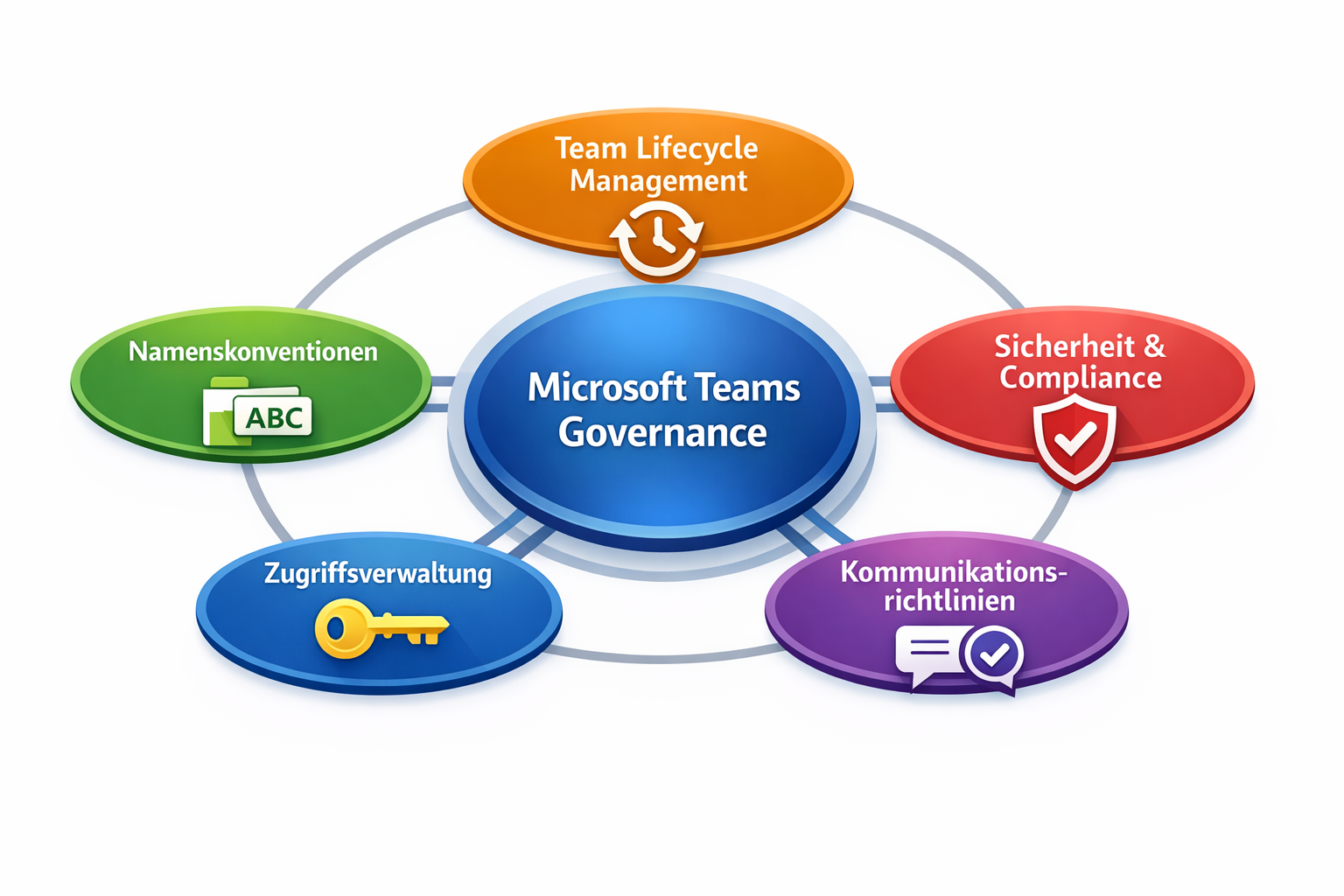
A comprehensive governance strategy rests on several pillars that interlock and complement each other.
Team Creation and Lifecycle: Here you define who is allowed to create teams and according to which criteria. Some organizations use an approval model where every team creation must be approved by IT or management. Others use self-service approaches with automated workflows. Also crucial is managing the team lifecycle – from creation through regular reviews to archiving or deleting inactive teams.
Naming Conventions and Classification: A clear naming structure may seem trivial, but it's worth its weight in gold. When all teams are named according to a uniform scheme, users find what they're looking for more quickly. Classification labels also help identify the sensitivity level of information and automatically apply appropriate protective measures.
Access Management and Guest Policies: Who is allowed to add members? Under what conditions may external guests be invited? What permissions do they receive? These questions must be clearly answered. Microsoft 365 offers granular control options here, from entitlement management to conditional access.
Compliance and Data Protection: Retention policies ensure that data is stored or deleted according to legal requirements. DLP (Data Loss Prevention) policies prevent the inadvertent sharing of sensitive information. eDiscovery features enable you to search data for legal or internal investigations when needed.
Communication Policies: Define which communication channels should be used for which purposes. Should certain announcements only be made in official channels? Are there policies for tone of communication or the use of mentions?
Practical Implementation: From Theory to Practice
The implementation of a governance strategy ideally begins with a workshop in which you define requirements together with stakeholders from various departments. Technical feasibility meets organizational needs and legal frameworks here.
Use the tools integrated in Microsoft 365: Entra ID for access management and group policies, the Compliance Center for retention and DLP, PowerShell for automation and advanced configurations. The Teams Admin Center provides a central hub for many governance settings.
For more complex requirements, you can turn to third-party solutions like BCC Affirmatic. This offers advanced automation, detailed reporting functions, and user-friendly workflows for approval and review processes.
Common Pitfalls and How to Avoid Them
Many organizations make the mistake of viewing governance as a purely technical project. In reality, it's at least as much a change management topic. Involve your users early, communicate transparently why certain rules are necessary, and offer training.
Another classic mistake is making governance policies too restrictive. If users feel like they're being slowed down at every step, they'll look for workarounds or switch to unauthorized tools – the opposite of what you want to achieve. Find the balance between control and flexibility.
Also, don't forget to treat your governance strategy as a living document. Microsoft continuously develops Teams further, new features are added, and your organization's requirements change. Schedule regular reviews to adjust your policies.
Measurable Success: KPIs for Teams Governance
How do you recognize if your governance measures are working? Define clear metrics. The number of inactive teams should decrease, the average search time for information should shorten, and compliance violations should decline. Use Microsoft 365's reporting functions to track these metrics and demonstrate the value of your governance initiative to management.
Conclusion: Governance as an Enabler, Not a Brake
Microsoft Teams Governance is not a necessary evil, but a strategic success factor for modern collaboration. A well-thought-out governance strategy creates clarity, increases security, ensures compliance, and ultimately makes your Teams environment more productive and pleasant for everyone involved.
Don't start by trying to regulate everything at once. Begin with the most critical areas – often these are security and compliance – and expand your governance step by step. With the right balance between control and flexibility, you create an environment where innovation and secure collaboration go hand in hand.
BCC Affirmatic: Governance Automation at the Next Level
While native Microsoft 365 tools provide a solid foundation, many administrators reach their limits with more complex governance requirements. This is where BCC Affirmatic comes in, extending the built-in functions with intelligent automation and user-friendly workflows. The solution offers automated team lifecycle management with configurable attestation processes, where team owners must regularly confirm the relevance and membership of their teams. Particularly valuable is the self-service portal functionality, which enables users to create teams according to predefined templates while automatically enforcing all governance rules, naming conventions, and compliance requirements in the background. BCC Affirmatic also offers comprehensive reporting and analytics functions that go far beyond Microsoft 365's standard reports, as well as automated notifications and escalation processes. For organizations that want to elevate their Teams governance to a professional level without increasing management complexity, BCC Affirmatic is the optimal solution.
🎥 Learn more in our on-demand webinar: Project Workspaces in Microsoft Teams: From Request to Archive. https://www.bcchub.com/en/videos-webinars/bcc-affirmatic-webinar-teamsgovernance?hsLang=en