
Published on November 26, 2026
Microsoft Agent 365 and Agent Governance: What Ignite 2026 Changed

Microsoft Agent 365 is Microsoft's control plane for AI agents: a registry, access control and security for agents across Microsoft 365, Entra, Purview and Defender. At Microsoft Ignite 2026, Microsoft added views for inactive and ownerless agents, shadow AI controls and lifecycle policies for agent identities, many of them in preview. Affirmatic AgentCharter builds on these controls and brings the governance principles you already apply to Teams, SharePoint sites, groups and guests to AI agents: business ownership, access reviews, automated lifecycles and documentation. Every agent gets an owner in the business, who confirms it in the same process as Teams and guests.
Ignite 2026 made one thing clear: Microsoft takes agent governance seriously. M365 teams now find agent controls in the Microsoft 365 admin center, Microsoft Entra, Intune, Purview and Defender. This article explains what Microsoft announced, what it means for your governance model and where Affirmatic AgentCharter fits in. It is written for M365 engineers and IT decision-makers. Status as of November 2026.
What you'll learn
- What Microsoft announced at Ignite 2026 for governing AI agents, and what is still in preview
- What Microsoft Agent 365 and Microsoft Entra Agent ID each do
- How Affirmatic AgentCharter extends your governance for Teams and guests to AI agents
- Which governance questions remain for the business, not for IT
- How Affirmatic AgentCharter complements Microsoft
Contents
- At a glance: Microsoft controls and Affirmatic AgentCharter
- One governance foundation for people, resources and AI agents
- What Ignite 2026 changed for agent governance
- Microsoft Agent 365: the control plane
- Microsoft Entra Agent ID: owners, sponsors and lifecycle
- What Microsoft leaves to your business process
- How Affirmatic AgentCharter works
- Next steps
- FAQ
At a glance: Microsoft controls and Affirmatic AgentCharter
Microsoft provides the controls for AI agents in Microsoft 365. Affirmatic AgentCharter does not replace them. It connects them to a governance process that business owners run themselves.
One governance foundation for people, resources and AI agents
In Microsoft 365, people, resources and AI agents work closely together. Employees and guests use Teams, SharePoint sites and groups, and AI agents act as digital employees on exactly these resources. Governance therefore only works if it covers all three together.
Affirmatic provides this shared governance foundation for all Microsoft 365 resources: clear accountability through business ownership, secure self-service, policies and access reviews, automated lifecycles, and reports and documentation, even across multiple tenants. Affirmatic AgentCharter now brings these core principles to AI agents in Microsoft 365. You don't build a separate governance model for AI. You extend the one you already have.
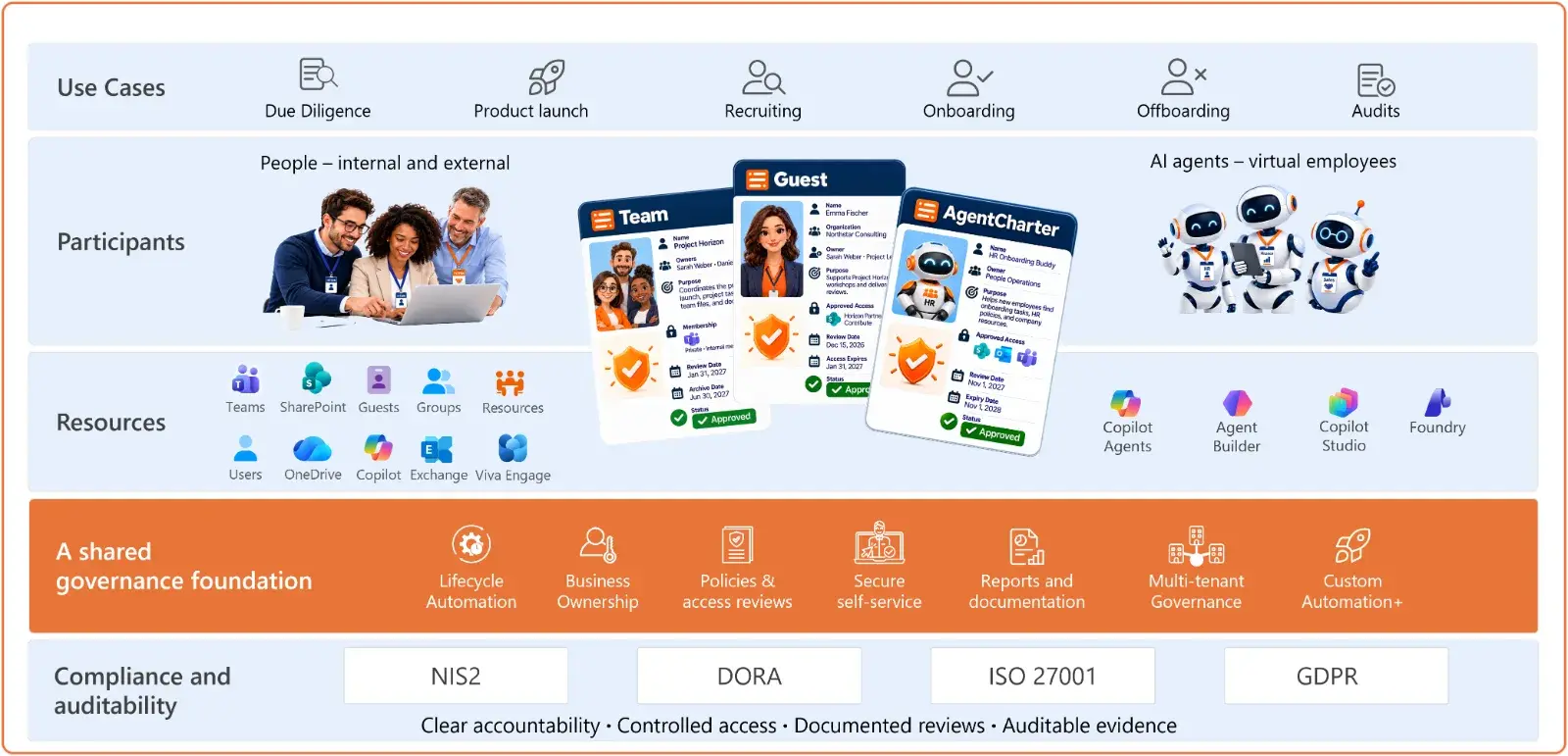
The table shows how each principle you know from Teams and guest governance carries over to AI agents:
| Governance principle | Teams, sites, groups and guests | AI agents with Affirmatic AgentCharter |
|---|---|---|
 Business ownership |
Every workspace and every guest has a named, accountable owner | Every agent shows its owner in the agent directory (available). Owner reassignment when people change roles (next releases) |
 Policies and access reviews |
Owners confirm members and guest access on a schedule | Agents run through the same scheduled access reviews (available) |
 Automated lifecycle |
Inactive workspaces are detected, guest access expires, workspaces are archived | Agents unused for 30 days are flagged (available). Expiry date with follow-up action, blocking and deletion (next releases) |
 Secure self-service |
Guided requests with approval along the organisation | Agent requests with approval templates (next releases) |
 Reports and documentation |
Dashboards and evidence for every object | Agents, owners and review decisions on the same platform as all other objects (available) |
For your business owners, this means one process instead of two: they confirm their agents in the same way they already confirm their Teams and guests. Find out more about our solutions for Microsoft Teams management and guest user management.
What Ignite 2026 changed for agent governance in Microsoft 365
At Microsoft Ignite 2026, Microsoft announced several controls that address agent sprawl directly. Most of them are in preview, so check the status in your tenant before you plan with them. The most relevant announcements for governance teams, according to the Ignite 2026 Book of News and the Microsoft Entra blog:
- Action center in Agent 365: brings governance tasks into one view, starting with inactive and ownerless agents. Private preview is expected in December 2026.
- Local and shadow AI agents: Intune can discover AI agents on managed devices and mark devices with unapproved agents as noncompliant. Global Secure Access adds network visibility and control for local agents and MCP access. Both are in preview.
- Dynamic Agent Risk: combines runtime signals, exposure and blast radius into one risk level per agent (preview).
- Lifecycle policies for agent identities: Microsoft Entra notifies sponsors and owners when an agent identity has been inactive for 60 days, disables it after 90 days and deletes it after 455 days. Custom policies let sponsors reconfirm agents at fixed intervals. Microsoft Learn marks the lifecycle policies as preview (default policy, custom policies).
- Agent identities for more agents: Entra can create agent identities automatically for local agents and for agents on connected third-party platforms (preview).
For governance teams, this is good news. Microsoft now answers the technical questions: which agents exist, which ones are inactive or without an owner, and how risky they are. The organisational question remains: who in the business decides what happens next?
Microsoft Agent 365: the control plane for AI agents
Microsoft Agent 365 is Microsoft's control plane to observe, govern and secure AI agents. According to Microsoft Learn, it has been generally available for the commercial segment since 1 May 2026 and is licensed per user.
- Registry: a central view of agents with adoption and activity in the Microsoft 365 admin center.
- Access control: agent permissions, policies and reviews through the registry, Microsoft Entra and Microsoft Purview.
- Security: risk-based access in Entra, data risk visibility in Purview and threat detection in Defender.
In the Microsoft 365 admin center, admins can also enable, disable, assign, block or remove agents and approve agents submitted for publication (Microsoft Learn).
Microsoft Entra Agent ID: owners, sponsors and lifecycle
Microsoft Entra Agent ID gives AI agents their own identities and separates three roles (Microsoft Learn):
- Owner: a technical administrator responsible for setup, configuration and credentials. Owners are optional.
- Sponsor: a business representative accountable for the agent's purpose and lifecycle decisions. Each agent identity needs at least one sponsor.
- Manager: the person responsible for the agent in the organisation's hierarchy.
With Microsoft Entra ID Governance, access for agent identities can be granted through access packages with an end date, and sponsorship can move to the sponsor's manager when the sponsor leaves. Microsoft lists Microsoft 365 E7, or Agent 365 together with at least Microsoft Entra ID P1 or Microsoft 365 E3, as licensing options for these governance features (Microsoft Learn).
What Microsoft leaves to your business process
Microsoft's controls find agents, flag risks and enforce technical rules. Four questions still need an answer in your organisation:
- Who in the business is accountable? A lifecycle policy can notify a sponsor. Someone in the business still has to decide whether the agent is needed, and creators change roles.
- Who approves, and along which structure? Approvals should follow your organisation, for example by department, not by who happens to hold admin rights.
- Is it consistent with everything else? Teams, SharePoint sites, guests and agents should follow the same owner, expiry and review rules, not four different ones.
- Where is the evidence? Internal audit, ISO 27001 auditors and works councils ask who approved what, when and why. That answer belongs in one place.
Microsoft provides the controls. Affirmatic AgentCharter adds the business process behind them: business units confirm their agents themselves, without an IT ticket.
How Affirmatic AgentCharter works
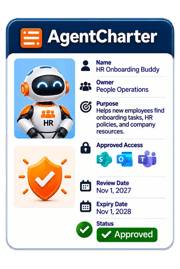
Affirmatic AgentCharter is a module of Affirmatic, BCC's Microsoft 365 governance platform. It treats AI agents like digital teammates: with a clear purpose, an accountable owner and a managed lifecycle. Every agent gets a digital employee badge with its purpose, owner, approved access, next review and expiry date. Behind it are four principles that Affirmatic already applies to Teams, SharePoint sites and guests.
 Transparency: every AI agent in view
Affirmatic AgentCharter reads the agents from Microsoft 365 and records them automatically in a central inventory. New agents, for example from Copilot Studio, appear there without manual upkeep.
- Type, owner and users: You can tell at a glance whether an agent works for individuals, a team or the entire company.
- Status and last activity: Agents that have not been used for 30 days are flagged as inactive before they keep running unnoticed and become a risk.
Accountability: no AI agent without an owner
No employee works without a manager. Every AI agent also needs a person in the business who is accountable for its purpose, its audience and its access, following the same business ownership principle that Affirmatic applies to Teams, sites and guests.
- Business owners: Every agent shows its accountable owner. That makes it clear who is responsible for the agent's purpose, content and audience.
- The business decides: Owners confirm need and access directly in the business, without an IT ticket. IT defines the guardrails, the business makes the decisions.
- Reassign owners safely (next releases): When an owner changes teams or leaves the company, responsibility is handed over in a controlled way. Orphaned agents without a contact person become a thing of the past.
Lifecycle: no agent goes unreviewed
Digital teammates have a start date, regular reviews and an orderly exit, just like onboarding and offboarding people.
- Regular access reviews: At defined intervals, the owner confirms that the agent is still needed and that the audience is still right. Every review is documented.
- Expiry date with follow-up actions (next releases): The owner is reminded in good time and decides whether to extend use or retire the agent.
- Blocking and deletion (next releases): Agents that are no longer needed, unapproved or orphaned are blocked and deleted in a controlled way. Automated workflows take the load off IT.
Auditability: ready to answer at any time
Affirmatic AgentCharter works like a digital personnel file: owners, approvals and review decisions are documented in a traceable way, with who, when and why. Dashboards, reporting and end-to-end documentation provide the evidence for internal audits and requirements such as NIS2, DORA, ISO 27001 and GDPR.
 Risk-based: as much freedom as possible, as much control as necessary
Not every AI agent needs the same rules. The wider an agent's audience, data access and permissions, the stricter its governance:
- Personal agents: Agents for one or two users are created via self-service, without a request. The creator is the owner, and inactivity is detected automatically.
- Team agents: An owner and a defined audience are mandatory. Regular owner reviews keep operations secure.
- Business-critical agents: Agents with sensitive data, extensive permissions or company-wide use get permission checks by admins and reviews by the business, and with the next releases also approval before deployment. Each organisation decides for itself when an agent counts as business-critical.
Use Microsoft Agent 365, Entra Agent ID, Purview and Defender for the technical controls: identities, access, device and network policies and runtime security. Add Affirmatic AgentCharter when you want to extend the governance you already run for Teams, SharePoint sites and guests to AI agents: business owners confirm their agents regularly, with one approval and review process for all objects and one place for the evidence.
Quick win: Check today how many of your agent identities in Microsoft Entra have a sponsor who still works for your company. Every agent without an active sponsor is a candidate for your first review.
Next steps: check your tenant for AI agents
In the Microsoft 365 Agent Readiness Check, BCC experts run around 24 checks on owners, sharing, AI apps, app permissions, roles and licences in your tenant and walk you through the report in about 30 minutes via Teams. As a launch offer, the first 20 registrations until 3 December 2026 receive the check free of charge.
Read more about the module on the Affirmatic AgentCharter page, start with our guide to agent sprawl in Microsoft 365, or book a session with our governance experts.
FAQ: Microsoft Agent 365 and agent governance
What is Microsoft Agent 365?
Microsoft Agent 365 is Microsoft's control plane to observe, govern and secure AI agents in an organisation. It includes an agent registry, access control and security integration with Entra, Purview and Defender. It has been generally available since 1 May 2026 and is licensed per user.
What did Microsoft announce at Ignite 2026 for agent governance?
At Ignite 2026, Microsoft announced an action center in Agent 365 for inactive and ownerless agents, discovery and control of local and shadow AI agents through Intune and Global Secure Access, Dynamic Agent Risk and lifecycle policies for agent identities in Microsoft Entra. Most of these capabilities are in preview.
What is the difference between an owner and a sponsor in Microsoft Entra Agent ID?
In Microsoft Entra Agent ID, an owner is a technical administrator who manages setup, configuration and credentials of an agent identity. A sponsor is a business representative accountable for the agent's purpose and lifecycle decisions. Each agent identity needs at least one sponsor.
Does Microsoft Agent 365 replace third-party agent governance?
Microsoft Agent 365 provides the technical control plane for AI agents. Third-party agent governance such as Affirmatic AgentCharter builds on it and adds the organisational process: business owners, regular reviews and evidence across all Microsoft 365 objects.
Do I need a separate governance model for AI agents?
No. AI agents need the same principles as Teams, SharePoint sites and guests: a named owner, regular reviews, a controlled lifecycle and evidence. Affirmatic AgentCharter extends the governance model you already run with Affirmatic to AI agents instead of adding a second one.
What is Affirmatic AgentCharter?
Affirmatic AgentCharter is the agent governance module of Affirmatic, BCC's Microsoft 365 governance platform. It brings the governance principles of Affirmatic to AI agents: every agent gets an owner in the business and runs through the same access reviews as Teams, SharePoint sites and guests.
How do I find ownerless AI agents in Microsoft 365?
Start with an inventory of all agents and their sponsors or owners. Microsoft is adding views for ownerless agents to Agent 365, and Affirmatic AgentCharter shows every agent with its owner, users and activity, flagging agents that have not been used for 30 days.

Looking for on demand
webinars and video training?
View our Videos & Webinars page to see upcoming webinars, watch past webinars, and view our on demand training videos.


View upcoming events
See all industry events that BCC will be attending in the near future.
View events
Auf der Suche nach On-Demand-Webinaren und Video-Trainings?
Besuchen Sie unsere Seite für Videos & Webinare, um bevorstehende Webinare zu sehen, vergangene Webinare anzuschauen und unsere On-Demand-Trainingsvideos zu betrachten.
Bevorstehende Veranstaltungen ansehen
Sehen Sie alle Branchenveranstaltungen, an denen BCC in naher Zukunft teilnehmen wird.
Veranstaltungen ansehen