
Home › Solutions › Agent Governance › Agent Readiness Check
Microsoft 365 Agent Readiness Check: Is your tenant ready for AI agents?
AI agents use the data, sharing settings and permissions that already exist in your tenant. Where Teams and sites have no owner, “Anyone” links are allowed or every user can consent to apps, agents inherit these weaknesses.
The Agent Readiness Check shows you, with figures and specific objects from your own tenant, where to start before you roll out AI agents more widely. In a Teams session of around 30 minutes, we create your report with around 24 checks together and discuss the findings straight away.
The check is the first step towards Affirmatic AgentCharter: it lays the foundation for your AI agents to work as digital employees with a clear mandate, an accountable owner and reviewed access.
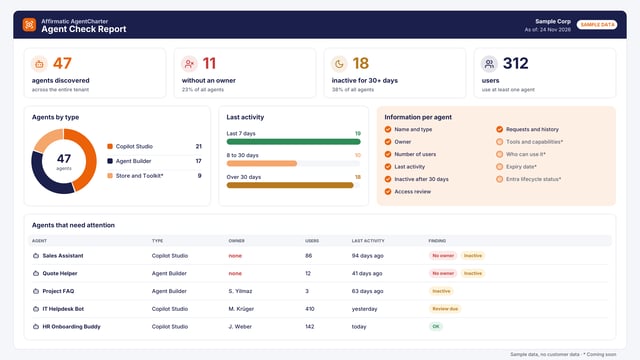
Your report with findings and next steps (sample data).

Launch offer: 20 free places until 3 December 2026
The first 20 registrations receive the Agent Readiness Check free of charge. After that, the regular price is €198 plus VAT. 20 of 20 places still available.
Agents inherit whatever your tenant allows. The check shows you beforehand.
Read-only access. No Agent 365 required. Results in minutes. Clear next steps.

Read-only
Nothing changes in your tenant.
Dedicated app registration
One-time admin consent
Revocable in Entra ID

Without Agent 365
Meaningful without an extra licence.
No additional licence needed
Agent 365 data, if available
No penalty for missing data

Fast
Report within minutes.
Around 24 checks
PDF report and Excel file
Repeatable in Affirmatic

Clear steps
From finding to decision.
Three decisions before you start
Responsible role for each step
Results discussion included
What we check: around 24 checks
The report is divided into seven areas. Each check shows its result, the number of affected objects and named examples. If licences or permissions are missing, the affected checks appear as “not available” and do not lower your score.

Tenant overview
Members, guests, Teams, groups and SharePoint sites, plus the key findings at a glance.

Access and licences
Active, assigned and available seats for Microsoft 365 Copilot and other relevant products.

AI apps with access to company data
Which AI apps such as ChatGPT, Claude or Otter your users have connected to their work account, and which permissions they hold, for example to email or files.

App consent and permissions
Who can register and consent to apps, whether an admin consent process exists, and which apps have far-reaching permissions or no owner.

Teams, sites and sharing
Teams, groups and sites without active owners, inactivity, guests, “Anyone” links and sharing limits.

Access policies and roles
Global admins, privileged roles and MFA.

Next steps
Three decisions to make before deploying agents, each with the responsible role.
If your tenant already has agent identities in Entra ID, the report also shows their owners, status, permissions and expiring credentials.
AI agents are coming. Is your tenant ready?

Do your Teams and sites have active owners?
Agents access this content. Is anyone accountable for it?

How open is your sharing?
Are “Anyone” links and guest access deliberately controlled?
Who can consent to apps?
Is there an admin consent process, or can anyone consent?
Which AI apps are reading along?
Do AI apps have access to email or files through work accounts?

Are privileged roles protected?
How many global admins are there, and is MFA enforced throughout?
A report that prepares decisions
You receive a PDF report of around five pages. The first page gives management an overview, and the following pages put the findings into context for IT and the business. The report states its reference date and shows where data is missing. You also receive all details as an Excel file.

Example: from finding to decision
Your tenant allows anonymous SharePoint links. Before an agent answers questions about internal policies from a library, the person responsible for that library reviews the existing links. Based on this finding, IT decides which libraries the agent may use.
Considering Agent 365? The check gives you an overview first, so you can optimise your tenant before committing to additional licences.
Who the check is for
For organisations that are preparing, carrying out or have completed their Copilot rollout, even without an Agent 365 licence. Typical triggers are a planned or ongoing rollout of Copilot or Copilot Studio, first agents in individual departments, or a request from security, compliance or internal audit about the use of AI.
Microsoft 365 and digital workplace
Clarity before deploying agents.
You run the check together with us and get the basis for your next steps.
IT leadership and CIO
Decide based on facts.
The first page of the report summarises findings, risks and the next decisions.
IAM and IT security
Assess findings with confidence.
Sharing, access policies and privileged roles, with specific objects from your tenant.
How the Agent Readiness Check works
Register
Secure your place.
Fill in the registration form. We will get back to you within one business day, confirm your place, arrange an appointment and set up your access to Affirmatic in advance.
Check via Teams
Report in around five minutes.
Via screen sharing, you sign in and connect your tenant with the one-time consent of your administrator. This person should therefore attend the session.
Results discussion
Around 20 minutes, in the same session.
We discuss the findings and agree together what to tackle first. You receive the PDF and Excel file to share internally.
From Readiness Check to Affirmatic AgentCharter
The Readiness Check shows whether your tenant is ready for AI agents. You govern the agents themselves with Affirmatic AgentCharter. Every agent receives a digital ID badge that makes its purpose, owner, approved access, next review and expiry date visible. This way, AI agents work like digital employees: with a clear mandate, an accountable owner and a managed lifecycle.
You resolve findings on Teams, guests and sites with BCC Affirmatic, the shared governance foundation for all Microsoft 365 resources. AgentCharter brings its principles to your agents. Every Agent. Governed Right.
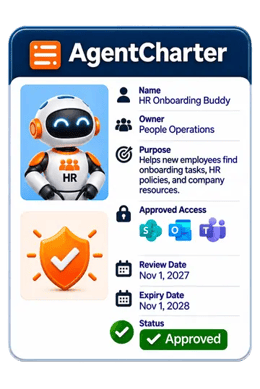
The AgentCharter: the digital employee ID badge for every AI agent.
What the check deliberately does not cover
No complete agent inventory: A central view of all agents is provided by Affirmatic AgentCharter.
No costs or Copilot credits: Microsoft currently only provides this data via preview APIs. It is not included in the first version.
AI apps via work accounts only: Tools used in the browser with a personal account remain invisible.
What you need
A Microsoft 365 tenant
A person with administrator rights who grants one-time consent to the app registration during the session
We provide the access to Affirmatic
The check works with read-only permissions only: we make no changes to your tenant, we do not read secret values, and you can revoke consent in Entra ID at any time.
Frequently asked questions about the Agent Readiness Check
What is the Microsoft 365 Agent Readiness Check?
The Agent Readiness Check assesses whether your Microsoft 365 tenant is ready for the use of AI agents. Around 24 checks evaluate owners, sharing, AI apps, app permissions, roles and licences. The report shows the results with figures and specific objects from your tenant.
Do I need a licence for Microsoft Agent 365?
No. The report is meaningful without Agent 365. If Agent 365 is available, we add the data from the Microsoft catalogue. Missing licences or permissions do not lower your score.
What does the check change in my tenant?
Nothing. The check runs through a dedicated app registration with read-only permissions. Your administrator consents once and can revoke consent in Entra ID at any time.
How long does the check take?
Around 30 minutes via Teams. The report is ready after about five minutes. In the remaining 20 minutes or so, we discuss the findings and agree on the next steps.
Does the check capture all AI agents in my tenant?
No. The check shows the prerequisites in your tenant and, if present, agent identities in Entra ID. If Agent 365 is licensed, we add the data from the Microsoft catalogue. A central view of all agents with owners, reviews and lifecycle is provided by Affirmatic AgentCharter.
How much does the Agent Readiness Check cost?
The first 20 registrations until 3 December 2026 receive the check free of charge. After that, the price is €198 plus VAT.