
Published on August 6, 2026
Affirmatic What's New: More Than 160 Improvements to Your Microsoft 365 Governance

.png)
A look at Microsoft 365 governance automation in Affirmatic: more than 160 improvements from Version 2.5.0 to 3.5.0, covering guest management, SharePoint, Teams, architecture, and automation.
.
Half a Year, One Big Release for the M365 Governance Platform
Affirmatic's mission is simple to state: one governance solution for every Microsoft 365 workload, sovereign by design. We help organizations move through their Microsoft 365 transformation with confidence, from migration to governance at scale to adopting AI capabilities like Copilot, without ever trading away digital sovereignty.
Between Version 2.5.0 and Version 3.5.0, we put real weight behind that mission. More than 160 improvements landed across this stretch, touching nearly every corner of the product. That figure was estimated with AI assistance, so treat it as an order of magnitude rather than an exact statistic. Either way, it reflects just how much has changed in Affirmatic over the past six months, both in what you see on screen and in what runs quietly underneath. As one small sign of broader workload coverage, Affirmatic has also supported read access to Viva Engage communities since Version 2.5.0.
Guests, SharePoint, Groups, and Teams: More Consistency Day to Day
Guest management saw one of the largest clusters of work. We introduced consistent naming conventions for documents, the option to silence notifications during bulk guest creation, new dashboard widgets for guest activity, customizable form fields for guest sign-up, and automated offboarding options that archive or disable expired guest accounts.
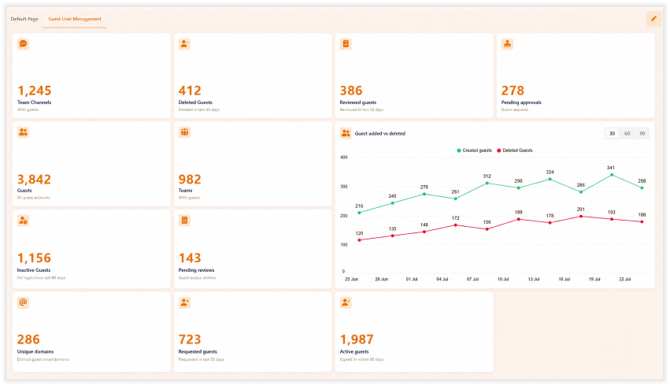
Screenshot of the guest management dashboard with widgets for guest user activity.
On top of that, guests can now be assigned to the right M365 groups automatically at provisioning, guest naming is enforced continuously through Desired State Configuration, and a new self-service workflow lets an inviter request that an unlisted domain be approved rather than simply hitting a dead end. Language support across guest management was also improved.
In SharePoint management, enforcement of sensitivity labels together with a reworked view of shared links, including the ability to delete them individually or in bulk, gives you tighter control in exactly the areas that matter for oversharing.
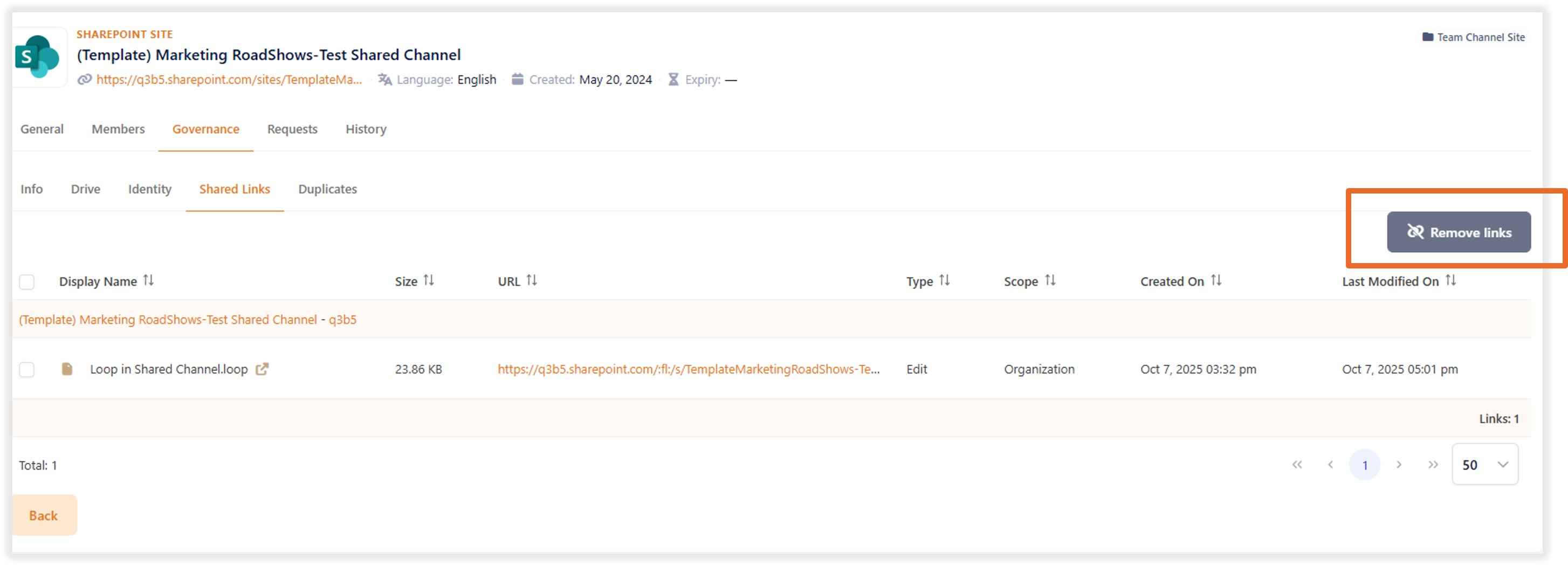
Screenshot of the shared links overview in SharePoint with bulk delete option
Import processes are now customizable, granular, and incremental, which keeps large environments performant instead of forcing a full re-import every time.
Group management now shows nested groups transparently, and every relevant M365 group type, from security groups to mail-enabled security groups to distribution groups, can be created directly through templates instead of routing through Custom Automation+.
Teams management adds recurring team access reviews, template-based channel requests, and the ability to duplicate requests, all of which save real time in day-to-day operations.
Faster Onboarding, More Room for Custom Processes
User management moved forward too: you can now assign multiple Microsoft 365 licenses at once, onboarding runs fully on templates, and updates to existing users follow templates as well. The underlying goal is straightforward: a new hire starting on day one should be able to work immediately, with the right permissions, groups, and licenses in place, instead of waiting days for approvals to trickle in one by one. For the custom processes that fall outside the standard product, Custom Automation+ now supports CSV import, for example from HR or ITSM systems, making bulk object creation considerably easier.
Administration and User Experience: More Clarity, More Personalization
On the administration side, active multi-domain handling, auto-deployment of approval templates and preconfigured event actions, and email notifications sent through the modern Microsoft Graph interface all add clarity and speed when onboarding new instances. Desired State enforcement has been extended well beyond guests: naming conventions for Teams, groups, and shared mailboxes are now enforced automatically too, with any drift corrected on its own.
On the user experience side, 14 importable, brand-compliant themes, Adaptive Cards for notifications directly inside Teams, and a fully customizable welcome screen with personal quick actions and a role-based dashboard are all now available.
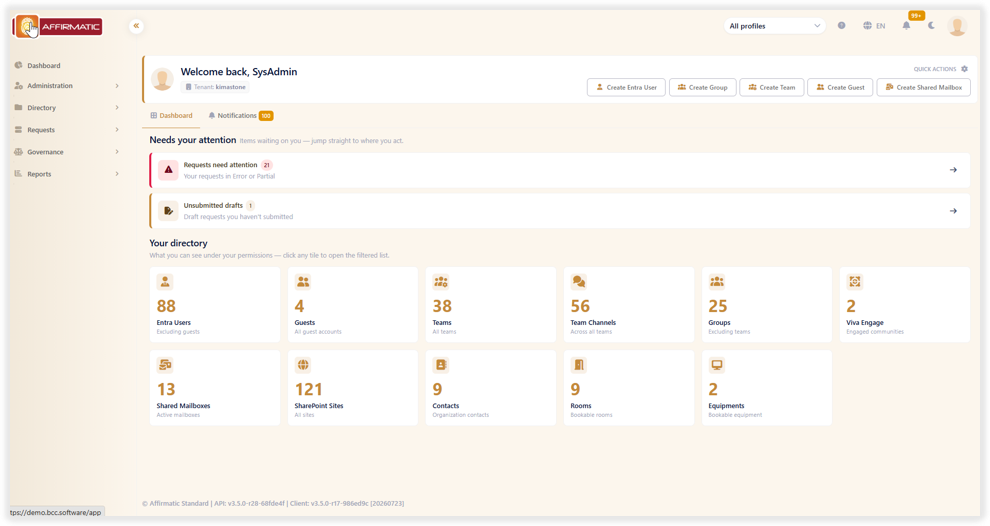
Screenshot of the personalized welcome screen with quick actions and role-based dashboard in Affirmatic
And in Affirmatic Connect, our API layer for workflows originating in ServiceNow, Jira, or other ITSM systems, more granular permission controls and API-based creation of shared mailboxes add both security and reach.
A Sturdier Foundation for What's Next
Beyond the features you can see, we also invested in the architecture underneath. Affirmatic now runs entirely on Kubernetes, the database has moved from licensed Microsoft SQL to open-source PostgreSQL, and imports now cover all M365 object types faster and more dynamically. Together, this gives us a more stable, better-scaling platform to build the next generation of Affirmatic on.
Go Deeper
If you want more details, we will put together topic-specific blog posts in the next couple of weeks. In the meantime feel free to book a individual online session with our Microsoft 365 governance experts, and see the new Affirmatic opportunities live in action.
Additionally check out our BCC webinar library with many useful recording on Teams management, Guest user management, sprawl protection and Copilot readiness.
FAQ
What is Microsoft 365 governance automation?
Microsoft 365 governance automation refers to platforms like Affirmatic that automate governance processes across every Microsoft 365 workload, from guest management to SharePoint to Teams, helping organizations move through their Microsoft 365 transformation with confidence and without trading away digital sovereignty.
What changed in Affirmatic between Version 2.5.0 and 3.5.0?
Between Version 2.5.0 and 3.5.0, Affirmatic shipped more than 160 improvements spanning guest management, SharePoint, groups and Teams, user onboarding, and the underlying architecture.

Looking for on demand
webinars and video training?
View our Videos & Webinars page to see upcoming webinars, watch past webinars, and view our on demand training videos.


View upcoming events
See all industry events that BCC will be attending in the near future.
View events
Auf der Suche nach On-Demand-Webinaren und Video-Trainings?
Besuchen Sie unsere Seite für Videos & Webinare, um bevorstehende Webinare zu sehen, vergangene Webinare anzuschauen und unsere On-Demand-Trainingsvideos zu betrachten.
Bevorstehende Veranstaltungen ansehen
Sehen Sie alle Branchenveranstaltungen, an denen BCC in naher Zukunft teilnehmen wird.
Veranstaltungen ansehen