
Published on April 24, 2026
Microsoft Copilot for Microsoft 365 Explained: Fundamentals for IT Admins

Microsoft Copilot in Microsoft 365: Fundamentals, how-it-works and benefits for any organization
Many organizations are currently evaluating the use of Microsoft Copilot in Microsoft 365 - and are asking similar questions: What exactly does Copilot do? How does it compare to other AI tools? And what does its introduction mean in practice for IT administration and existing infrastructure?
This article provides IT admins, Microsoft 365 admins, and IT managers with a structured foundation: technical classification, architecture, permission model, and typical usage scenarios without unnecessary theoretical overhead.
Many organizations are currently evaluating the use of Microsoft Copilot in Microsoft 365 and are asking similar questions: What exactly does Copilot do? How does it compare to other AI tools? And what does its introduction mean in practice for IT administration and existing infrastructure?
This article provides IT admins, Microsoft 365 admins, and IT managers with a structured foundation: technical classification, architecture, permission model, and typical usage scenarios without unnecessary theoretical overhead.
You don’t just want to read about Microsoft 365 topics, you want deeper insights and practical perspectives?
What Is Microsoft Copilot in Microsoft 365?
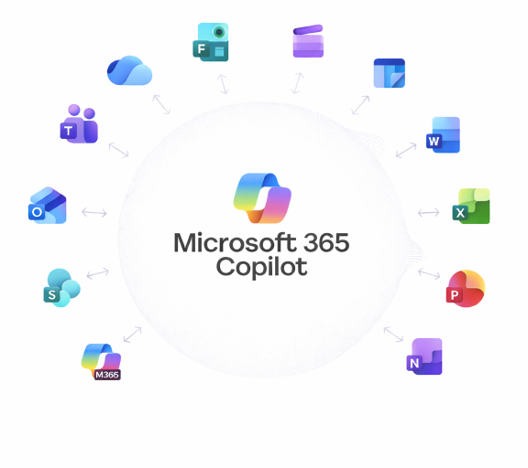
Microsoft Copilot is an AI - powered assistant that is directly integrated into Microsoft 365. It is natively available in Word, Outlook, Teams, PowerPoint, and Excel, supporting users with typical knowledge work tasks without requiring a separate platform or additional login.
Crucially, Copilot does not operate in isolation but within the existing Microsoft 365 tenant. It only accesses content for which the respective user is licensed and authorized. Existing permission structures (for example, SharePoint permissions or Exchange access rights) are neither modified nor bypassed.
For IT admins, this is particularly relevant: Copilot is not a standalone data store and does not create new data silos. It uses Microsoft Graph as its data foundation - operating entirely within the tenant’s existing compliance and security infrastructure.
Microsoft Copilot vs. Other AI Tools: Key Differences
A common comparison is made with general AI chat tools such as ChatGPT or other publicly available models. These differences are especially important in an enterprise contex:
| Comparison criterion |
Microsoft Copilot (Microsoft 365) |
General AI chat tools (e.g. ChatGPT) |
|---|---|---|
| Data source | Microsoft Graph: emails, documents, calendars, chats -tenant-specific | General language model training; no access to corporate data |
| Permission model | Full enforcement of existing Microsoft 365 permissions (SharePoint, Exchange, etc.) | No permission model; no separation by user or role |
| Context awareness | Enhanced through grounding with current work context (open documents, ongoing meetings, chats) | Only via manual copy & paste; no automatic organizational context |
| Integration | Native integration into Word, Outlook, Teams, PowerPoint, and Excel - no context switching | External chat interface; output must be transferred manually |
| Privacy & compliance | Processed within the Microsoft 365 tenant; existing DLP policies and compliance settings apply | Depends on provider and terms of use; data may leave the corporate environment |
| Data retention | Inputs are not used for model training with a commercial Microsoft 365 license | Depends on provider; free versions may use inputs for training |
| Deployment & management | Centrally managed via the Microsoft 365 Admin Center; licensing and policies per user or group | Managed per tool; no central IT control; increased risk of shadow IT |
| Audit & logging | Activities can be audited via Microsoft Purview | No native audit logging in an enterprise context |
Copilot combines information from emails, calendar entries, chats, and documents and processes it directly where it is needed - for example, within a Word document or a Teams conversation.
Technical Architecture: How Microsoft Copilot Works
1. Large Language Model (LLM)
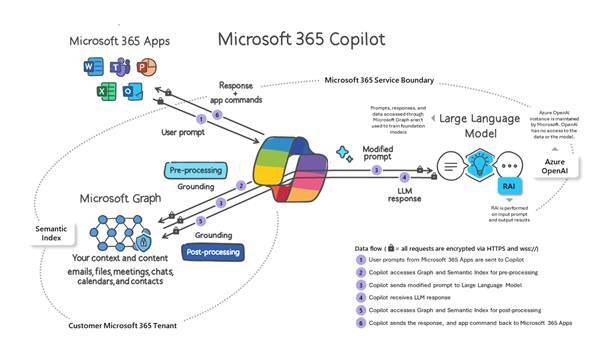
The underlying language model handles the processing of natural language input and text generation. Microsoft uses models from the GPT family, provided through the Azure OpenAI Service.
2. Microsoft Graph
Microsoft Graph is the central API layer for Microsoft 365 data. Copilot uses Graph to retrieve relevant content from the working context - documents, emails, calendar entries, and chats - and incorporates this data into response generation.
3. Grounding
Microsoft refers to “grounding” as the process by which user input is enriched with organizational context before being passed to the language model. As a result, responses are not generated based on general training data, but on relevant, tenant-specific information.
Microsoft Copilot operates across the entire platform and fundamentally changes how Microsoft 365 is used.
Learn how we support organizations holistically with Microsoft 365 - from platform architecture and governance to the effective use of Copilot.
Microsoft Copilot operates across the entire platform and fundamentally changes how Microsoft 365 is used.
We support organizations holistically - from Microsoft 365 platform architecture and governance to the effective and secure use of Copilot.
Copilot in the existing M365 environment: What’s changing—and what isn’t
A common misconception: Copilot does not require a fundamental restructuring of the IT landscape. It complements existing Microsoft 365 applications rather than replacing them.
What Does Not Change:
-
Existing applications and workflows remain in place
-
No new data silos or additional tool platforms
-
Permission structures and compliance settings remain effective
What Changes:
-
Users can complete tasks more efficiently (summaries, drafts, research)
-
Training requirements shift toward prompt literacy
-
IT admins must configure Copilot access, policies, and licensing via the admin center
Note for Microsoft 365 admins: Copilot is managed through the Microsoft 365 Admin Center and Copilot-specific policies (for example, which users or groups are allowed to use Copilot). A careful permissions review is recommended prior to rollout.
Typical Use Cases for Microsoft Copilot
Microsoft Copilot is particularly helpful for tasks that are frequent and time-consuming in everyday knowledge work:
-
Finding and summarizing information: Emails, meeting notes, and documents - Copilot summarizes content and highlights what matters most.
-
Creating drafts: Texts, presentations, or replies based on existing documents or guidelines.
-
Combining context: Bringing together information from different sources (email, chat, documents) for a specific task.
-
Revising and structuring content: Shortening, rephrasing, or restructuring existing documents.
These capabilities are available directly within the respective Microsoft 365 applications without switching context to an external tool.
Copilot Agents: Automation as the Next Step
Copilot Agents are distinct from the classic Copilot experience. These AI-driven automations can independently execute recurring processes based on Copilot. While standard Copilot assists with individual tasks on demand, agents can act proactively and support more complex workflows.
For IT admins and developers, this introduces additional control and governance requirements that must be considered separately.
Prompting: Actively Influencing Output Quality
The quality of Copilot’s output depends directly on the quality of the input. For structured results, prompts should address the following aspects:
-
What should be created or summarized?
-
What will the result be used for (internal/external, target audience)?
-
Which sources should be included (specific documents, emails, meetings)?
-
What format is required (summary, bullet points, continuous text, length)?
Conclusion: Microsoft Copilot as an Integrated Part of Microsoft 365
Microsoft Copilot is not a generic AI tool and not a replacement for professional judgment. It is a context - aware assistant within Microsoft 365 with a clear permission model, deep integration into existing applications, and tangible value in everyday knowledge work.
For IT admins and Microsoft 365 admins, this means that implementation requires careful preparation especially regarding permissions, licensing, and governance but does not introduce fundamentally new infrastructure complexity.
Microsoft Copilot therefore forms the foundation for more advanced topics such as rollout scenarios, Copilot governance, and the use of Copilot Agents within organizations.
Are you planning to introduce Microsoft Copilot or do you have specific questions about architecture, permissions, or governance?
We would be happy to discuss this with you in an initial, non-binding conversation.

Looking for on demand
webinars and video training?
View our Videos & Webinars page to see upcoming webinars, watch past webinars, and view our on demand training videos.


View upcoming events
See all industry events that BCC will be attending in the near future.
View events
Auf der Suche nach On-Demand-Webinaren und Video-Trainings?
Besuchen Sie unsere Seite für Videos & Webinare, um bevorstehende Webinare zu sehen, vergangene Webinare anzuschauen und unsere On-Demand-Trainingsvideos zu betrachten.
Bevorstehende Veranstaltungen ansehen
Sehen Sie alle Branchenveranstaltungen, an denen BCC in naher Zukunft teilnehmen wird.
Veranstaltungen ansehen