Microsoft 365 Teams Governance & Lifecyle Management

Microsoft Teams has become one of the most widely used collaboration tools across organizations of all sizes. As usage grows, many organizations face challenges with uncontrolled Teams creation, inconsistent naming, unclear ownership, and increased security and compliance risks.


BCC Affirmatic provides a complete and scalable approach to Microsoft Teams governance that supports provisioning, security, guest access, lifecycle control, and workflow automation across Microsoft 365.

With  BCC Affirmatic, Microsoft Teams are created with the right structure, the right owners, and the right security settings from the start. Guest users are managed through defined approval paths, and Teams that become inactive are identified and handled based on clear lifecycle rules. The result is a Microsoft 365 environment that is easier to manage, more secure, and ready to scale as collaboration needs evolve.

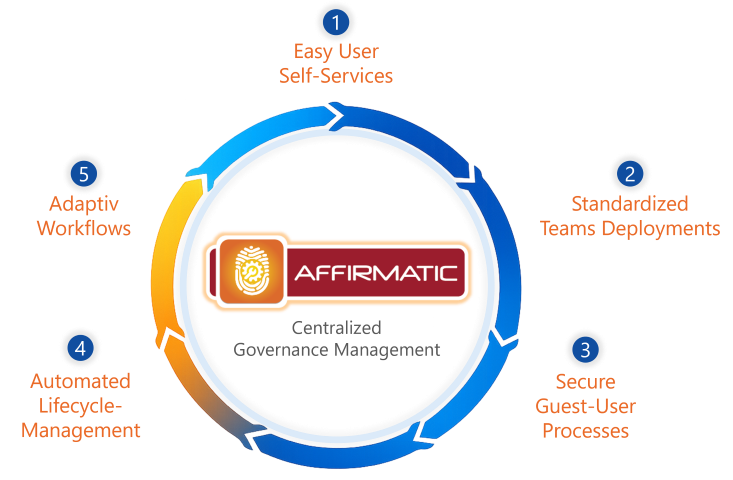
Five-step BCC Affirmatic governance model for Microsoft 365 and Microsoft Teams.

1. Easy User Self-Services

Step-by-step requests with template selection

Use BCC Affirmatic to request new Microsoft Teams follow a defined self-service flow. During the request, information about business purpose, ownership, data classification, and expected lifecycle is collected. Naming rules and required settings are applied automatically, which ensures consistent creation right from the start.

Requests submitted directly in Microsoft Teams

Users do not need to visit a separate request portal. All governance logic is available inside Microsoft Teams, which keeps the experience simple and familiar. Required fields and rules are enforced during the request so that every Team is created with the correct information.

Standardized request logic and clear responsibilities

All similar use cases follow the same request rules across the organization. Owners are assigned during the request, so responsibilities are clearly defined and IT does not need to follow up after the Team is created.

2. Standarized Microsoft Teams Deployment & Templates

Template-based deployment with predefined structures

Microsoft Teams are created using predefined templates that include channel structure, naming rules, sensitivity settings, and other configuration details. This gives every Team a reliable starting point and reduces the need for adjustments later.

Automated setup of channels, tabs, and apps

Channels, tabs, and integrated apps are added automatically based on the selected template. This removes manual setup tasks and ensures that Teams are ready for use as soon as they are created.

Consistent configuration across all Teams

Templates and deployment rules ensure that similar Team types follow the same structure. This prevents inconsistent setups and guarantees that governance standards are applied automatically.

Affirmatic request template configuration interface with governance settings and approval options.
Affirmatic request template configuration interface with governance settings and approval options. 
EN_GuestUserTemplate
 Affirmatic guest template settings with owner enforcement, access agreement, review period, and required onboarding fields. 

3. Secure Guest User Management for Microsoft Teams

Controlled guest invitations with approval workflows

Guest access requests follow a defined approval process instead of ad hoc decisions. This ensures that every external user is reviewed and approved before gaining access to internal information.

Clear ownership for all external users

Each guest is linked to an internal owner who is responsible for the access. Ownership remains visible and traceable, even if projects or roles change.

Regular reviews and time-limited access

Guest access is reviewed at defined intervals to confirm ongoing business need. Access can be limited in time, and inactive guest accounts are removed automatically based on policy.

Learn more about our Guest User Management.

4. Automated Microsoft Teams  Lifecycle-Management

Detection of inactive and obsolete Teams

Team activity is monitored to identify workspaces that are no longer in use. This creates visibility and prevents uncontrolled growth of unused Teams.

Structured archiving and deletion workflows

Archiving and deletion follow defined policies and multi step workflows. This ensures consistent lifecycle decisions without manual cleanup.

Owner involvement through revalidation

Team owners receive notifications asking them to confirm whether the Team is still needed. Their decision guides the lifecycle action and keeps documentation accurate for audits.

Affirmatic Teams governance dashboard with visibility into ownership, activity, and lifecycle controls.

Affirmatic Teams governance dashboard with visibility into ownership, activity, and lifecycle controls. 

Microsoft 365 Teams Approval Template Special Approvers
Approval template with conditional approvers based on request context 

5. Flexible Governance Workflows for Teams Administration

Governance rules based on Team context

Workflows adapt to the Team type, department, sensitivity level, or intended use. This makes it possible to apply the right rules to the right scenarios without a rigid one size fits all approach.

Flexible approval paths by requirement

Approval flows vary based on business requirements. Sensitive teams may require additional review steps, while standard teams can follow a faster approval path.

Scalable governance as usage grows

As Teams usage increases, governance workflows scale with it. New templates, classifications, and rules can be introduced without redesigning existing processes.

Frequently Asked Questions

How does this differ from Microsoft’s native Teams governance?

Microsoft provides configuration settings and baseline lifecycle policies. Affirmatic introduces enforceable provisioning, ownership continuity, lifecycle automation, and cross-workload oversight. Governance is applied consistently across Teams and the connected Microsoft 365 objects rather than managed in isolation.

Can Teams creation be restricted to defined governance standards?

Organizations can route Teams provisioning through controlled templates that enforce naming conventions, metadata requirements, ownership thresholds, and expiry rules. Direct creation can be limited if required by policy.

What occurs when a Team reaches its expiry date?

When a Team reaches its defined lifecycle endpoint, predefined actions such as lock, archive, or deletion can be executed. All lifecycle actions are recorded for traceability.