
Published on January 26, 2026
Team Cloning for Consistent Microsoft Teams Governance


Enterprise collaboration platforms rarely drift because someone made the wrong call.
They drift because organizations move. Teams are created to deliver work and settings are adjusted to match context. Structures change as priorities change.
Each choice is reasonable at the time. Over months and years, those choices accumulate.
Teams created for similar purposes begin to look and behave differently over time. Channel structures diverge, apps appear unevenly, guest access follows local judgement, and ownership becomes harder to trace when accountability is needed.
Nothing breaks and work continues, but predictability gradually disappears.
As adoption of Microsoft Teams grows, consistency does not appear by itself. It has to be built into the way Teams are created, which is where Microsoft Teams cloning becomes relevant as a governance mechanism rather than a technical shortcut.
Consistency does not scale automatically
Most organizations use Microsoft Teams for a limited number of recurring scenarios such as projects, departments, initiatives, customer engagements, and partner collaboration.
The intent is usually clear, but execution varies.
Each new Team involves decisions about owners, members, guests, channels, apps, files, tabs, and settings. When these decisions are made manually by different people, speed increases while alignment declines.
Over time, this leads to:
-
Higher administrative effort
-
Uneven collaboration experiences
-
Reduced transparency around ownership and access
-
Governance challenges caused by limited visibility
The difference shows up less in creation speed and more in how consistently Teams are set up.
A practical view from enterprise delivery
Consider a professional services organization running many customer projects in parallel.
At the outset, IT defines a recommended Team structure. As demand increases, project leads are encouraged to create Teams themselves so work can continue without delay and delivery is not blocked.
For a time, alignment holds. As projects progress, differences begin to appear. Some Teams include customers as guests while others rely on email, Planner is used in some projects but not in others, channel structures vary, apps are added selectively, and ownership changes as roles rotate.
Each Team continues to function and work moves forward. The pattern becomes clearer when leadership asks a simple question:
Are all active projects set up in a consistent and controlled way?
The answer is difficult to give. Reviews require manual effort, new project setup slows because it is unclear which structure should be reused, and IT time gradually shifts from enablement to comparison as manual setup becomes the default across many Teams.
Over time, this is how manual Team creation tends to play out at scale in Microsoft Teams environments.
Consistency comes from reuse
Consistency offers a dependable starting point that teams can build on as their work takes shape.
Instead of addressing differences after they appear, consistency tends to emerge more naturally when it is considered at the moment a Team is created and carried forward through reuse.
When Teams that already work well are reused as a standard, variation decreases without slowing delivery, and new Teams begin with a structure that is already familiar rather than starting from an empty space.
What works today quietly shapes what comes next.
Extended Team cloning with BCC Affirmatic
With extended Team cloning, BCC Affirmatic enables organizations to create new Teams based on an existing source Team.
This approach goes beyond basic templates and allows organizations to intentionally reuse collaboration models that already work in practice.
New Teams inherit relevant structures, settings, and patterns rather than recreating them manually. Team creation shifts from configuration effort to deliberate reuse.
What you can clone with Affirmatic
| What you can clone | Business Impact |
| Team Owners | Accountability is defined from the start and remains consistent. |
| Members | Internal collaboration begins with a familiar setup. |
| Guest membership | External collaboration follows a predictable pattern. |
| Public channels | Conversations and workspaces are structured consistently. |
| Private and shared channels | Advanced collaboration scenarios scale safely. |
| Team Settings | Privacy and governance behaviors stay aligned. |
| Apps | Essential tools are available from day one. |
| Tabs | Information and tools appear where users expect them. |
| Files and folders | Proven information structures are reused without manual setup. |
| Planner plans | Established task models accelarate execution. |
| Team tags | Communication patterns scale consistently across teams. |
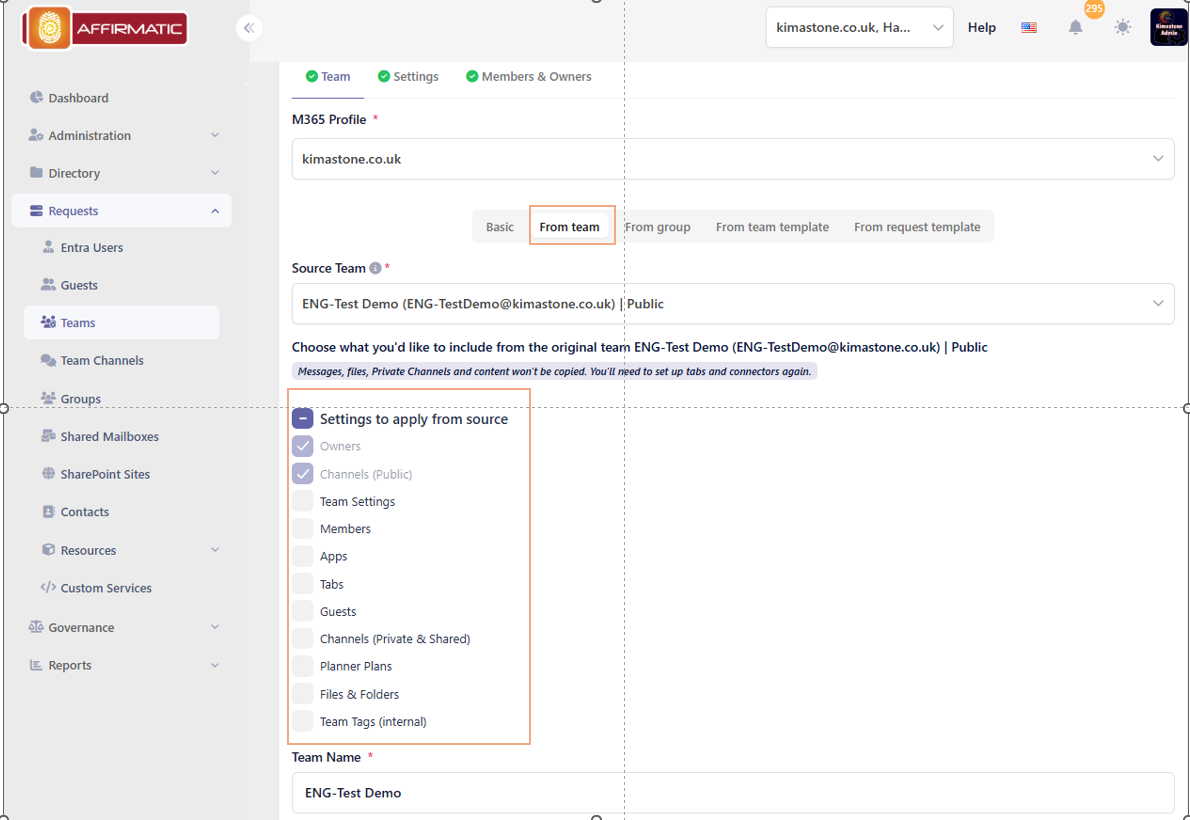
Each cloned Team reflects an intentional collaboration design.
Learn more about BCC Affirmatic.
Preventing inconsistency before it spreads
Once inconsistency is widespread, correcting it becomes expensive. Aligning many existing Teams requires time, coordination, and user involvement.
Prevention is more effective than cleanup. By standardizing how Teams are created, organizations align ownership, access, and collaboration patterns from the outset. Teams still adapt to their purpose, but they start from a common foundation.
Over time, this makes collaboration easier to follow and reduces ongoing effort.
Business impact of standardizing proven Teams
Standardizing successful Teams delivers tangible outcomes:
-
Faster Team creation without loss of structure
-
Clear ownership from day one
-
Consistent collaboration experiences across the organization
-
Reduced administrative and governance effort
-
Improved readiness for audits and reviews
Control becomes an enabler.
Scaling collaboration without fragmentation
BCC Affirmatic embeds extended Team cloning into a governed Microsoft Teams workflow, allowing organizations to reuse Team structures that already work while keeping visibility in place as collaboration grows.
Teams are created from familiar patterns rather than from scratch, and governance is present at the point of request instead of being introduced later. As a result, the environment grows in a way that remains understandable over time.
Scaling Microsoft Teams is less about technology and more about design choices.
When structure is repeatable, collaboration becomes easier to work with as it expands, and growth continues without undermining oversight.
This is one way organizations scale Microsoft Teams while keeping control intact.
🎥 Watch our on-demand webinar on Teams Governance in Microsoft 365:
https://www.bcchub.com/en/videos-webinars/bcc-affirmatic-webinar-teamsgovernance?hsLang=en

Looking for on demand
webinars and video training?
View our Videos & Webinars page to see upcoming webinars, watch past webinars, and view our on demand training videos.

View upcoming events
See all industry events that BCC will be attending in the near future.
View events
Auf der Suche nach On-Demand-Webinaren und Video-Trainings?
Besuchen Sie unsere Seite für Videos & Webinare, um bevorstehende Webinare zu sehen, vergangene Webinare anzuschauen und unsere On-Demand-Trainingsvideos zu betrachten.
Bevorstehende Veranstaltungen ansehen
Sehen Sie alle Branchenveranstaltungen, an denen BCC in naher Zukunft teilnehmen wird.
Veranstaltungen ansehen