
Published on November 4, 2026
Affirmatic 3.8: What's New for Microsoft 365 Governance

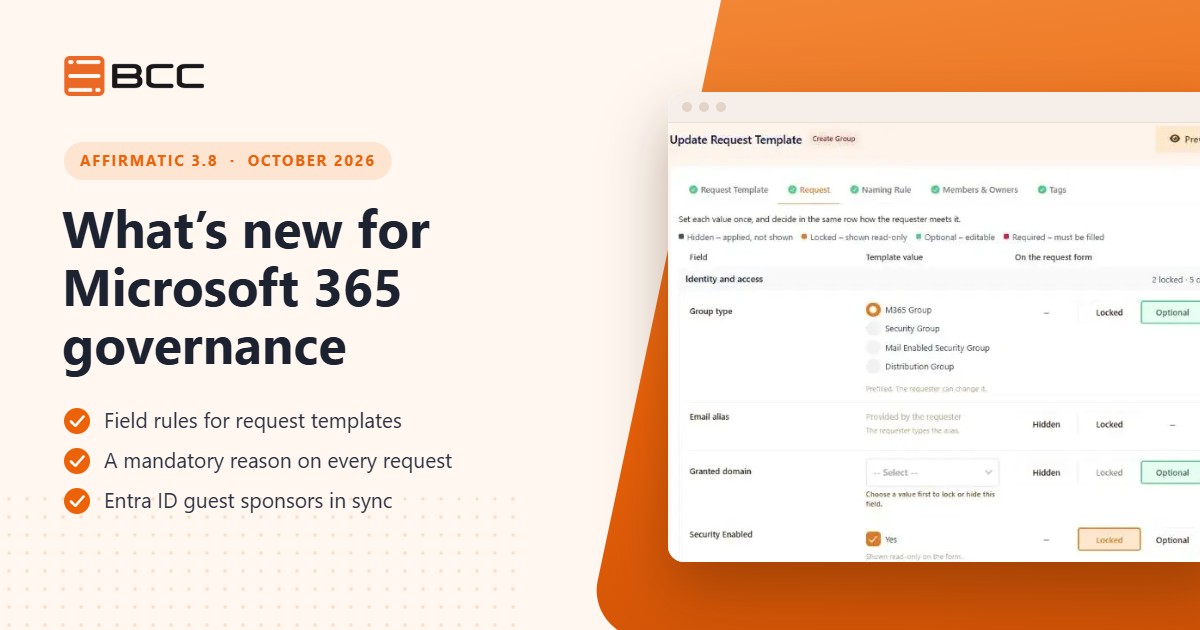
Affirmatic 3.8, released in October 2026, strengthens Microsoft 365 governance in three areas: field rules that make request templates binding, a mandatory reason that makes every request auditable, and Entra ID guest sponsors that stay in sync with Affirmatic.
Guests nobody feels responsible for, requests nobody can explain a few months later, request templates that requesters can work around: most governance risk in Microsoft 365 comes from access that nobody owns and decisions that nobody documented. Affirmatic 3.8 puts an owner on every guest and a reason on every request, and gives you full control over what requesters can change when they ask for something new.
What you'll learn
- How field rules make request templates impossible to work around
- Why a mandatory reason makes every change auditable
- How guest owners and Entra ID sponsors stay in sync
- How to resend a guest invitation without re-creating the guest
- One setting you can switch on right after the update
Contents
- Affirmatic 3.8 at a glance
- Field rules for Microsoft 365 request templates
- Entra ID guest sponsors and guest invitations
- Guided setup and Microsoft Marketplace
- Next steps
- FAQ
Affirmatic 3.8 at a glance
Affirmatic 3.8 was released in October 2026. The changes in Affirmatic 3.8 close gaps that typically appear once a Microsoft 365 tenant has grown: templates that only control half a form, requests without a documented reason, and guests without a responsible owner.
| Area | What's new | Who benefits most |
|---|---|---|
| Request templates | Field rules (hidden, locked, optional, required) and a mandatory reason | Microsoft 365 administrators, auditors |
| Guests | Entra ID sponsor sync, resend invitations, invitation status at a glance | Digital workplace teams, IT security, guest owners |
| Administration | Guided setup for new tenants, Microsoft Marketplace coming soon | New customers, procurement |
Field rules for Microsoft 365 request templates
Request templates are how Affirmatic turns your governance policy into everyday practice: when someone requests a new group or SharePoint site, the template decides what is allowed. Until now, templates controlled only part of the form. With 3.8, a template for creating groups, guests, Entra users, shared mailboxes or SharePoint sites gives every supported field one of four rules:
- Hidden: the template sets the value and the field does not appear on the form.
- Locked: the template sets the value and the field is shown but cannot be changed.
- Optional: requesters can fill in the field but do not have to.
- Required: requesters must fill in the field before they submit the request.
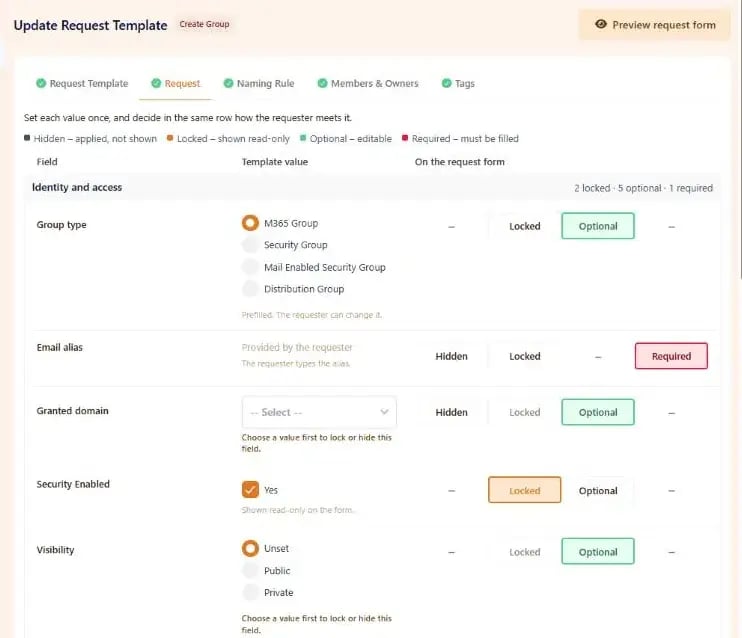
Field rules in a request template for Microsoft 365 groups: each field gets a template value and a rule for the request form.
Anyone who requests a new object through the template sees exactly the fields you allow, and each field only offers the rules that make sense for it. The rules apply consistently in the request form, the approval view and the API. You configure a template once, and requesters cannot work around it.
Configure a template once, and locked values stay locked, whether a request comes through the web app, an approval or the API.
Make the reason a mandatory field
A new setting in the M365 profile makes the reason mandatory on every request in that profile, whether it is submitted manually, in bulk, through the API or by the system. Approvers and auditors see straight away why a change was requested, and the reason stays with the request in its history. Months later, you can still see why a change was made, which is exactly what an audit asks for.
Entra ID guest sponsors and guest invitations
Access that nobody owns is one of the main sources of risk in a tenant. This release connects guests to the people responsible for them and shows at a glance whether a guest is actually using their access. The guest features are part of Affirmatic's guest management and require the Guest Management licence.
Sync guest owners and Entra ID sponsors
Microsoft Entra ID lets you assign sponsors to guest users: the people inside your organisation who are responsible for a guest. A new M365 profile setting writes a guest's Affirmatic owners to this sponsor field. The other way round, you can import the sponsors of existing guests as Affirmatic owners whenever you need to.
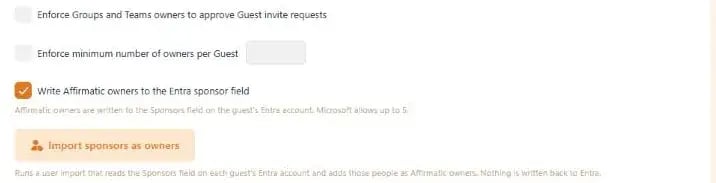
The new M365 profile setting writes Affirmatic owners to the Entra ID sponsor field, and a one-off import adds existing sponsors as owners.
Microsoft and Affirmatic then show the same responsible person for each guest, and guests that existed before Affirmatic have an owner for access reviews from day one.
Resend a guest invitation
If a guest has not accepted their invitation yet, you can send it again with Resend invitation on the guest's record. The guest's account, owners and memberships stay as they are, so there is no need to delete and re-create the guest.
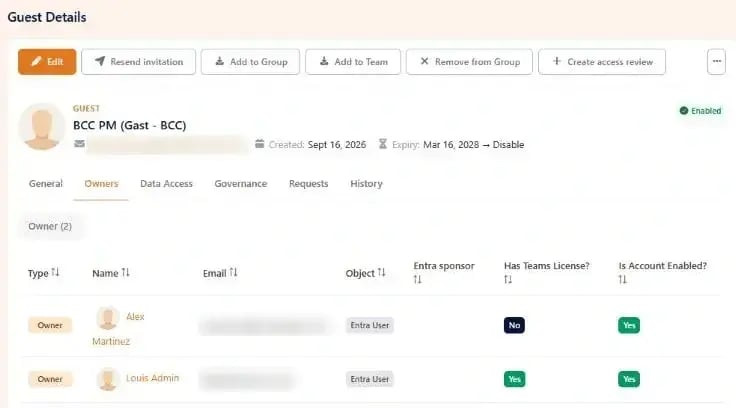
Resend invitation sits directly on the guest's record, next to the guest's owners and Entra sponsor status.
The record also shows whether the guest has accepted the invitation, whether they are still signing in, and whether sending failed, so you can see at a glance whether a guest is actually using their access.
Also smoother: if you request a new domain while creating a guest, you can refresh the form once the domain is approved and carry on, instead of starting over. In the Affirmatic app for Microsoft Teams, guest links in My Approvals now open inside Teams.
Guided setup and Microsoft Marketplace
Guided setup for new tenants
New tenants are guided through configuration with steps that match each user's role, and progress is remembered across sessions. Getting to the first working request takes less trial and error.
Coming soon to Microsoft Marketplace
Affirmatic will soon be available in Microsoft Marketplace, and the product is ready for it: activation and changes to the plan, seat count and subscription will then be processed automatically. You will be able to buy Affirmatic through your existing Microsoft agreement and billing.
Also new: the Governance tab of a OneDrive site now shows the OneDrive sharing settings, and the Appearance settings show the recommended logo size, a live preview and a warning when an image has the wrong proportions.
Quick win: after the update, open the settings of your M365 profile and make the reason a mandatory field. It takes a minute, needs no additional licence, and from then on every request in that profile documents why it was raised.
Next steps
Affirmatic is BCC's governance platform for Microsoft 365. It brings Teams, SharePoint, OneDrive, Entra ID users and guests and shared mailboxes under one set of rules, from the request through approval to review and expiry, hosted in the EU. If you want to see the new features in your own scenario, book an individual online session with our Microsoft 365 governance experts.
FAQ
What's new in Affirmatic 3.8?
Affirmatic 3.8, released in October 2026, adds field rules (hidden, locked, optional, required) for create request templates, a setting that makes the reason mandatory on every request, Entra ID sponsor sync for guests, resendable guest invitations and guided setup for new tenants.
What is a guest sponsor in Microsoft Entra ID?
A sponsor is a person in your organisation who is responsible for a guest user in Microsoft Entra ID. Affirmatic 3.8 can write a guest's Affirmatic owners to the sponsor field and import existing sponsors as Affirmatic owners, so both systems show the same responsible person and every guest has an owner for access reviews.
How do I resend a guest invitation in Microsoft 365?
In Affirmatic 3.8, open the guest's record and select Resend invitation. The guest's account, owners and memberships stay as they are, so you do not need to delete and re-create the guest. The record also shows whether the invitation has been accepted.
Which licences do the new features need?
The guest features require the Guest Management licence, and field rules for guest and shared mailbox templates follow the Guest Management and Shared Mailboxes licences. The mandatory reason is available without an additional licence.

Looking for on demand
webinars and video training?
View our Videos & Webinars page to see upcoming webinars, watch past webinars, and view our on demand training videos.


View upcoming events
See all industry events that BCC will be attending in the near future.
View events
Auf der Suche nach On-Demand-Webinaren und Video-Trainings?
Besuchen Sie unsere Seite für Videos & Webinare, um bevorstehende Webinare zu sehen, vergangene Webinare anzuschauen und unsere On-Demand-Trainingsvideos zu betrachten.
Bevorstehende Veranstaltungen ansehen
Sehen Sie alle Branchenveranstaltungen, an denen BCC in naher Zukunft teilnehmen wird.
Veranstaltungen ansehen